Activity Template
Activity Templates are the foundation of standardized task creation in Turfpal's Planning module. They provide reusable, configurable templates that ensure consistency and efficiency when creating tasks across your turf management operations.
What are Activity Templates?
Activity Templates are pre-configured task blueprints that define:
- What information needs to be collected for specific activities
- Which fields are required vs optional
- How equipment, venues, and products should be handled
- Custom data points specific to your organization's needs
Think of them as standardized forms that guide users through task creation while ensuring all necessary information is captured consistently.
Activity Templates → Used to create → Tasks in Day/Week/Year Planners
Why Use Activity Templates?
Consistency
- Ensure all team members collect the same information
- Standardize data across all similar activities
- Reduce variability in task documentation
Efficiency
- Speed up task creation with pre-configured fields
- Eliminate repetitive data entry
- Reduce training time for new users
Data Quality
- Mandatory fields ensure critical information is never missed
- Standardized options reduce data entry errors
- Structured data enables better reporting and analytics
Flexibility
- Customize templates for different activity types
- Create variants for specific scenarios
- Adapt templates as operations evolve
Key Concepts
Template Library
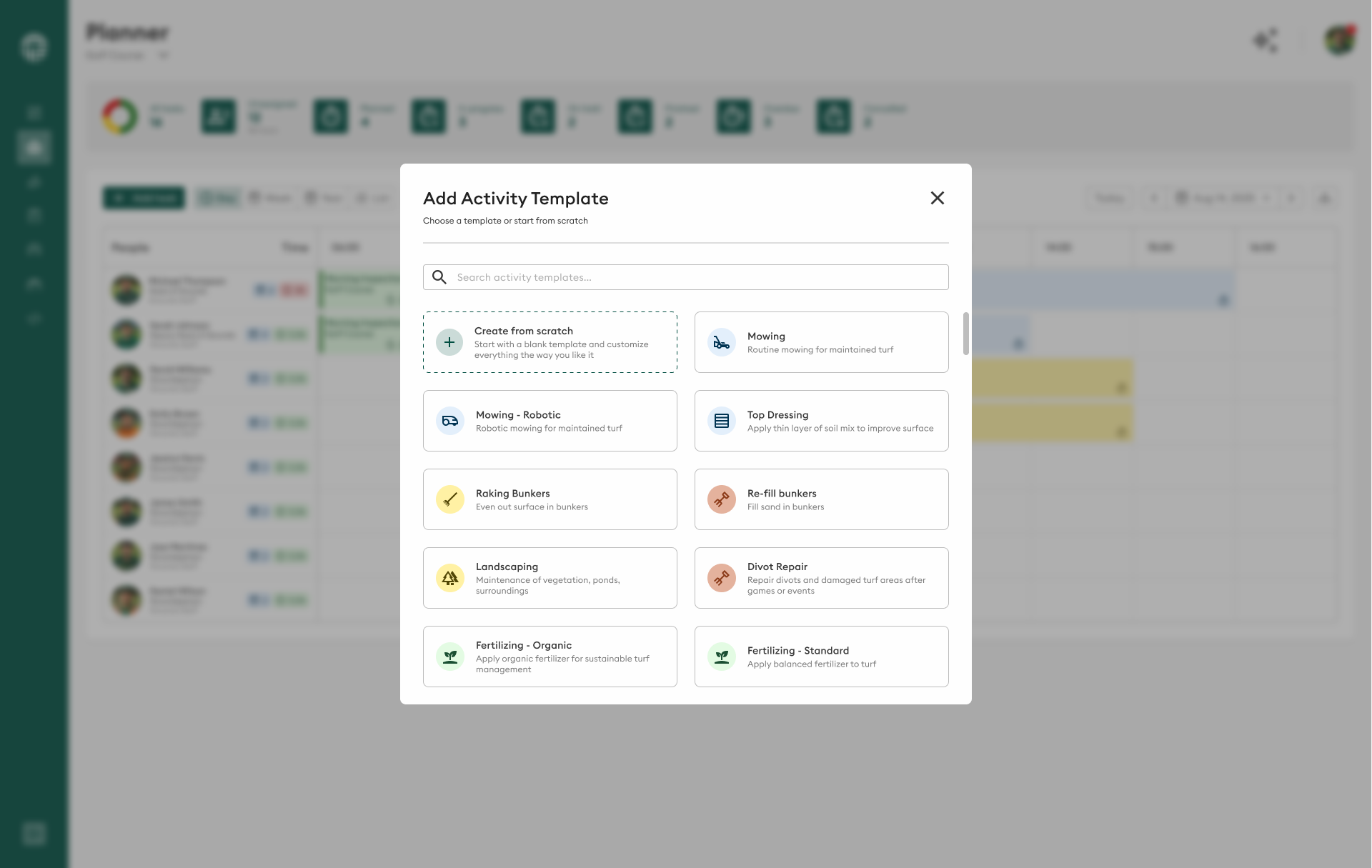
The Template Library is your central repository for all activity templates. It allows you to:
- Browse and search existing templates
- Create new templates from scratch
- Copy and modify existing templates
- Access shared templates from other organizations
Template Structure
Each activity template consists of:
Basic Configuration
- Name, group, and language settings
- Active/inactive status
- Approval state
Behavioral Settings
- Venue selection requirements
- Equipment assignment options
- Inventory/product selection
- Auto-completion rules
- Maintenance window availability
Custom Fields
- Text inputs for notes and descriptions
- Number fields for measurements
- Date pickers for scheduling
- Dropdowns and checkboxes for selections
- Multiple choice for complex options
Template Lifecycle
- Creation: Build template with required fields and settings
- Configuration: Add custom fields and set requirements
- Approval: Activate and approve for organizational use
- Usage: Template appears in planner task creation
- Maintenance: Update and refine based on feedback
- Archival: Deactivate when no longer needed
How Templates Work
In the Planning Workflow
When a user creates a task in any planner (Day, Week, or Year):
- They select an activity template from the library
- The template loads with all configured fields
- Required fields must be filled before saving
- Optional fields can be completed as needed
- The task is created with consistent structure
Template Activation
For a template to be usable in task creation:
- Active toggle must be enabled
- Approval status must be approved
- Template must be assigned to appropriate user groups
Inactive or unapproved templates remain in the library but cannot be selected when creating tasks.
Common Activity Templates
Maintenance Operations
- Mowing: Cut height, pattern, equipment specs
- Irrigation: Zones, duration, water usage
- Fertilization: Products, rates, nozzel settings, application method
- Aeration: Depth, pattern, equipment
Event Preparation
- Line Marking: Dimensions, paint type, special requirements
- Pitch Preparation: Surface checks, equipment setup
- Post-Event Recovery: Damage assessment, repair needs
Assessments & Monitoring
- Visual Quality: Color, density, uniformity ratings
- Playing Surface Tests: Hardness, smoothness, coverage
- Equipment Inspections: Condition checks, maintenance needs
- Turf Health Monitoring: Disease, pest, stress indicators
Specialized Activities
- Topdressing: Material type, depth, coverage area
- Overseeding: Seed variety, rate, germination tracking
- Pest Control: Treatment type, products, coverage
- Weather Protection: Cover deployment, monitoring
Template Capabilities
Field Types Available
Activity templates support diverse data collection through:
- Text Fields: Short answers and long descriptions
- Numbers: Measurements, quantities, calculations
- Dates: Scheduling, tracking, deadlines
- Checkboxes: Binary yes/no, confirmations
- Dropdowns: Single selection from lists
- Radio Buttons: Mutually exclusive choices
- Multiple Choice: Multiple selections allowed
- URLs: Links to external resources
Configuration Options
Templates can be configured to:
- Require venue/location selection
- Mandate equipment assignment
- Enable product/inventory tracking
- Auto-complete when fields are filled
- Integrate with maintenance windows
- Function as assessment-only activities
Template Management
Organization & Discovery
Organize templates effectively:
- Groups: Categorize by activity type (Mowing, Maintenance, Events)
- Naming Conventions: Use clear, descriptive names
- Search & Filter: Find templates quickly in the library
- Favorites: Mark frequently used templates
Version Control
Manage template changes:
- Edit templates to add/remove fields
- Deactivate obsolete templates
- Create new versions for different scenarios
- Archive old templates for historical reference
Changes to templates only affect new tasks. Existing tasks retain their original configuration.
Getting Started with Activity Templates
For Administrators
- Audit Current Activities: Identify common tasks that need templates
- Design Template Structure: Determine fields and requirements
- Create Initial Templates: Build templates for key activities
- Test with Users: Validate templates with actual users
- Roll Out Gradually: Deploy templates in phases
- Gather Feedback: Refine based on user experience
For Users
- Explore the Library: Browse available templates
- Understand Template Structure: Learn what each template collects
- Use Templates Consistently: Select appropriate templates for tasks
- Provide Feedback: Report issues or suggest improvements
- Request New Templates: Identify gaps in template coverage
Best Practices
Template Design
- Start simple: Begin with essential fields only
- Test thoroughly: Validate with actual users before rollout
- Document clearly: Add help text for complex fields
- Review regularly: Update templates based on operational changes
Naming & Organization
- Use descriptive names: "Mowing - Football Pitch - Match Prep"
- Group logically: Organize by activity type or venue
- Create variants: Make specific versions for different scenarios
- Maintain consistency: Use standard naming patterns
Field Configuration
- Required fields: Only mark truly essential fields as mandatory
- Field types: Choose appropriate input types for data
- Default values: Set sensible defaults where applicable
- Validation: Use data types to ensure valid inputs
User Adoption
- Train thoroughly: Ensure users understand template purpose
- Provide examples: Show completed tasks using templates
- Support users: Be available for questions and assistance
- Iterate continuously: Refine templates based on usage
Integration with Turfpal
Activity Templates integrate throughout the platform:
Planning Module
- Day Planner: Quick task creation with templates
- Week Planner: Recurring task setup using templates
- Year Planner: Strategic planning with template structure
- Task Lists: Consistent data across all views
Reporting & Analytics
- Standardized data enables meaningful comparisons
- Custom fields feed into advanced analytics
- Historical tracking across template usage
- Performance metrics by activity type
Mobile App
- Templates sync to mobile devices
- Field crew can complete templated tasks offline
- Consistent data collection in the field
- Real-time updates back to the platform
Quick Actions
🆕 Create Activity Template
Build new activity templates from scratch or start from the library
✏️ Edit Activity Template
Modify existing templates, add fields, and update configurations
Next Steps
Ready to start using Activity Templates?
- New to templates? Start with Create Activity Template to build your first template
- Need to modify? Check out Edit Activity Template to update existing templates
- Planning tasks? Learn how templates work in Day Planner, Week Planner, and Year Planner
By leveraging Activity Templates effectively, you create a standardized, efficient workflow for task management that improves consistency and data quality across your entire turf management operation.